Managing Apple devices at scale depends on one critical service — the Apple Push Notification Service MDM teams rely on for secure, real-time communication between devices and management platforms.
Think of APNs as the messenger between your Mobile Device Management (MDM) solution and Apple devices. Without it, remote management would be impossible.
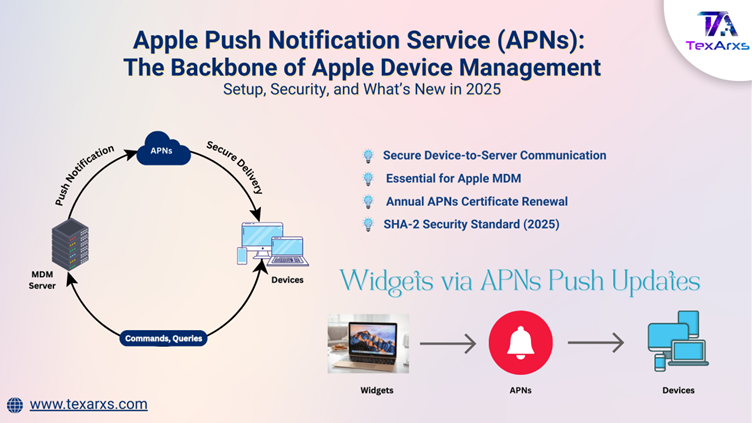
💡 How Apple Push Notification Service Works with MDM
1. MDM server → APNs
Your MDM solution sends a notification to APNs whenever a command is issued (like installing a profile, pushing an app, or locking a device).
2. APNs → Apple devices
APNs securely relay that notification to the right Apple device.
3. Device → MDM server
The device checks in with the MDM server, retrieves the actual command, and executes it.
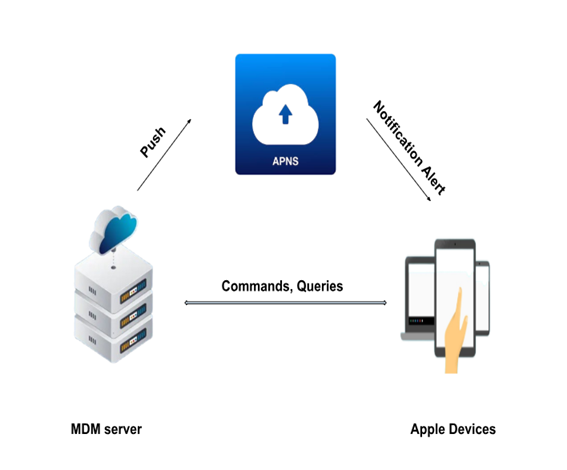
Apple Push Notification Services MDM workflow diagram
📜 Why Certificates Matter?
For this handshake to work, trust is everything. That’s why multiple certificates are required:
APNs Certificate – Authorizes the MDM server to talk to Apple devices. SSL Certificate – Secures communication between the MDM server and APNs. Signing Certificate – Used to digitally sign configuration profiles delivered to devices
⚠️ Certificates expire annually, and if not renewed, MDM communication breaks. This could mean losing control over existing devices or being unable to enroll new ones.
🌐 Network Requirements: Keeping the Pipes Open
Apple devices must connect directly (or via proxy) to Apple’s network 17.0.0.0/8 on these ports:
- TCP 5223 – Persistent connection to APNs.
- TCP 443 – Used during device activation, and as fallback if 5223 isn’t reachable.
- TCP 443 or 2197 – MDM servers use these to send notifications to APNs.
✅ Best Practices for Managing Apple Push Notification Service
✔️ Use a Managed Apple ID (via Apple Business Manager/School Manager) instead of a personal Apple ID — this avoids renewal headaches if someone leaves the team.
✔️ Plan renewals early — don’t wait until expiry week. Many MDMs (like Kandji, Addigy, Jamf) send reminders 30 days before.
✔️ For MSPs (Managed Service Providers), maintain a separate push certificate per customer to keep environments isolated.
✔️ Remember: Apple Vision Pro can only receive push notifications when worn and unlocked.
⚙️ Setting Up Apple Push Notifications
Configuring APNs for MDM involves a certificate-based process. Unlike Apple’s consumer notifications, token-based authentication is not supported for MDM.
Here’s the simplified setup workflow:
- Generate a Certificate Signing Request (CSR) – Done within the customer’s MDM environment. The private key stays in that environment.
- Sign the CSR – The MDM vendor signs it using their MDM signing certificate (with SHA-256 algorithm).
- Upload to Apple Push Certificates Portal – Customer logs in with a Managed Apple ID to upload the CSR.
- Download the APNs Certificate – Apple issues an MDM_ Certificate.pem.
- Upload to MDM Server – The APNs certificate is installed back into the MDM solution.
- Verify Certificate Chain – Ensure Apple Root → WWDR Intermediate → Signing Certificate are all present and valid.
🛠️ Tools for Verification
- certtool -e <filename.pem>
- openssl verify filename.pem
These confirm the integrity of the certificate chain.
🚨 Troubleshooting APNs Issues: When Devices Don’t Receive Push Notifications
If your Apple devices aren’t receiving push notifications, here are the key areas to check:
Check Network Connectivity
- Ensure devices have uninterrupted access to Apple’s servers via Wi-Fi, Ethernet, or mobile data.
- Verify your firewall/proxy allows traffic to Apple’s network 17.0.0.0/8.
Verify Required Ports
- TCP 5223 → For persistent APNs communication.
- TCP 443 → For device activation + fallback communication.
- TCP 2197 or 443 → For MDM servers sending notifications to APNs.
Confirm Certificates Are Valid
- Check if the APNs certificate is still active and not expired.
- Verify it was renewed with the same Apple ID used to create it.
Test Firewall & Proxy Settings
- Ensure SSL traffic is not being inspected or rerouted — APNs traffic must remain intact.
- For iOS 13.4, macOS 10.15.4, and later, confirm proxy settings are defined in a PAC file if used.
Check Device-Specific Scenarios
- Apple Vision Pro: Can only receive push notifications when the device is worn and unlocked.
- Supervised vs. Unsupervised devices: If re-enrollment is needed, workflows differ.
Review MDM Server Logs
- Confirm that the MDM server is successfully sending notifications to APNs.
- Look for errors like invalid tokens or certificate mismatches.
Renew or Re-Enroll if Needed
- If the certificate is expired and cannot be renewed with the original Apple ID, devices must be re-enrolled with a new certificate.
🆕 What’s New in 2025?
🔒 SHA-2 Security Standard (Now Live)
The Apple Push Notification service (APNs) has been updated with a new server certificate. Applications must include the USERTrust RSA Certification Authority (SHA-2 Root) in their Trust Store. This update strengthens APNs security and has already been applied in production.
📲 Widgets via APNs Push Updates
Apple now supports delivering widget updates using APNs. This allows apps to refresh widget content based on server-side changes or data syncs. A server sends a push notification via APNs with a content-available status, prompting WidgetKit to reload its timeline.
📌 Key Takeaways
Apple Push Notification service (APNs) is the backbone of Apple device management—enabling IT teams to enforce policies, deploy apps, and protect devices remotely. By staying proactive with certificates, securing network traffic, and following best practices, organizations can ensure smooth operations. Whether you’re an in-house IT admin or an MSP managing multiple customers, remember: your APNs certificate is your golden key — protect it, renew it, and never tie it to a single person.
***Looking for more insights on Apple in the enterprise? Stay connected with TexArxs for more Apple-focused content designed for professionals.***