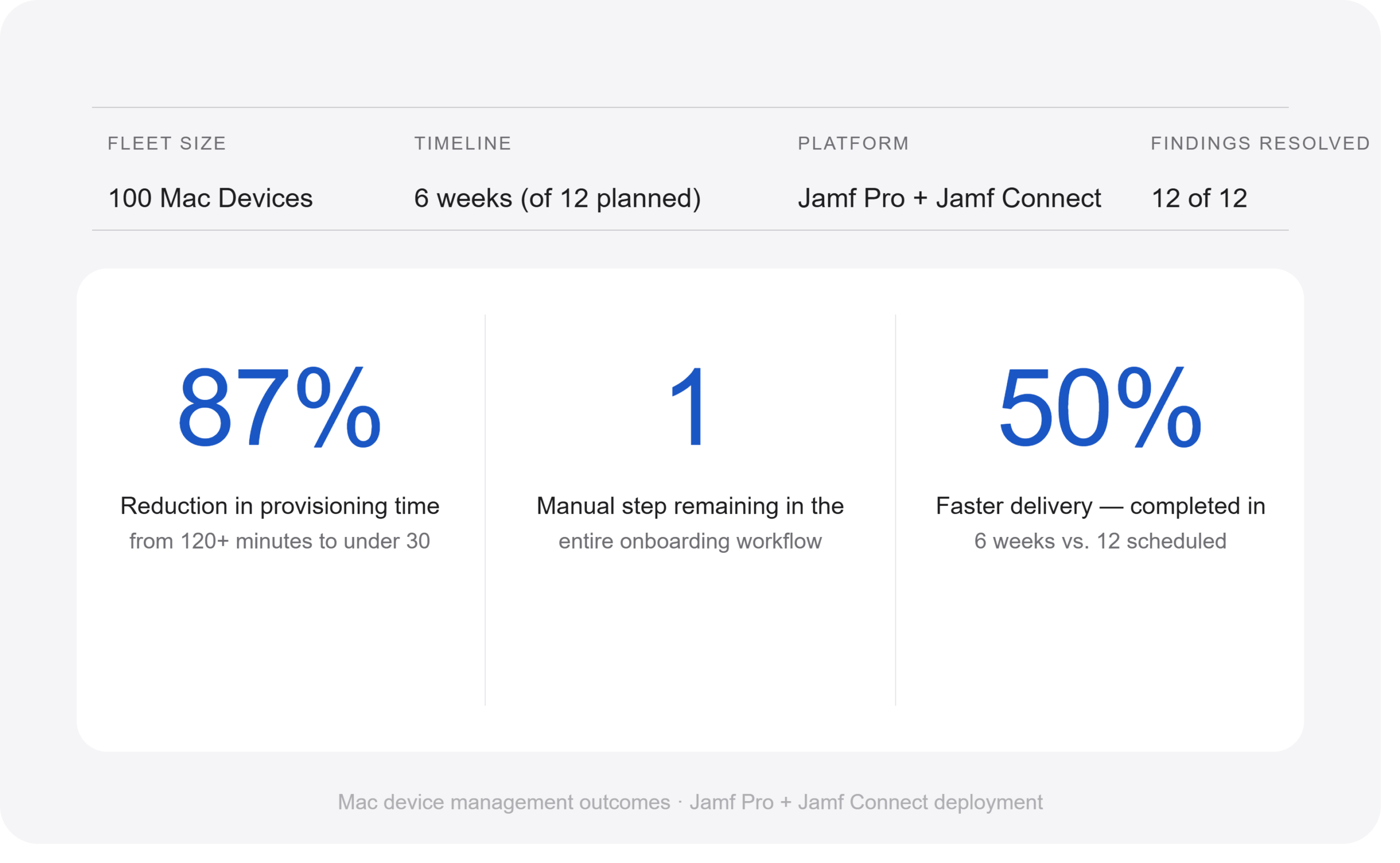
This case study shows how Mac device management automation transformed a 100-device fleet — moving from manual provisioning, platform clutter, and security gaps to a fully automated, zero-touch, compliance-ready environment delivered in half the scheduled time.
The Starting Point: Mac Device Management Before Automation
When this engagement began, the Mac fleet was technically functional — IT had enrolled devices, deployed applications and users could work. But underneath the surface, there was a significant amount of accumulated debt: misconfigurations the team had never addressed, processes that demanded constant manual IT effort, and a device management platform that nobody had cleaned up.
The goal of this engagement was not just to fix individual issues. It was to build a solid foundation — a Mac environment that was consistent, automated, secure, and documented — one that the team managing it going forward could actually understand and maintain.
What We Found
Consequently, initial assessment surfaced twelve distinct findings — ranging from configuration gaps that affected security, to platform clutter that made troubleshooting unnecessarily complicated.
1. New Mac Setup Was a Manual Process
Every new device required hands-on IT involvement. There was no automated provisioning flow — IT installed applications one by one, with no guarantee of consistent end-state.
2. Additionally, Application Installs Took Over Two Hours
The existing method took 120 minutes or more per install, tying up IT time and delaying device readiness.
3. A Security Gap in User Account Creation
Furthermore, the team did not create user accounts with correct encryption ownership status at first login — a macOS security boundary that IT cannot easily fix remotely after the fact. All 100 enrolled devices were affected.
4. Enrollment Used a Full-Admin Account
IT used a full-admin account to enroll new devices — a direct violation of least-privilege principles and a meaningful security risk.
5. A Device Management Platform Left Unchecked
The Jamf Pro environment had accumulated inactive, duplicated, and unscoped policies, old scripts, outdated packages, and redundant configuration profiles. Platform clutter creates real risk — old settings can conflict with new ones.
6. No Visibility Into Fleet Health
No structured patch management, no compliance dashboard, and no regular reporting. The team had no reliable way to answer basic questions about encryption status, OS versions, or app compliance.
How We Approached It — The Three Phases
The team structured the engagement in three phases, designed to move from understanding and stabilising the environment, through fixing and rebuilding, to establishing proactive ongoing management. The team delivered the full scope in six weeks — half of the twelve-week timeline originally proposed.
- Phase 1 — Understand & Stabilise
Full environment audit, zero-touch provisioning rebuild, identity (SSO) fix, enrollment account hardening, app delivery restructure. - Phase 2 — Fix & Rebuild
Unused objects cleanup, Smart Group rebuild, local account removal, encryption enforcement. - Phase 3 — Proactive Management
Patch management, compliance dashboards, full documentation — giving the team lasting visibility and the knowledge to maintain what was built.
What Was Built
A Fully Automated First-Boot Provisioning Flow
The most significant change was the complete rebuild of how new Macs are set up. The new flow uses Jamf Setup Manager — a first-boot provisioning tool that launches when a Mac is powered on for the first time and guides the entire setup sequence from enrollment through to a fully configured, ready-to-use device.
Instead of tasks running silently in the background with no feedback, Jamf Setup Manager presents each step on screen in real time — the user and IT can see exactly what is happening, what has completed, and what is still in progress. If anything fails, it is visible immediately.
The macOS Onboarding Process
- Automated Enrollment
Apple Business Manager automatically recognizes the Mac when it contacts Apple activation servers. The Mac begins Automated Device Enrollment immediately without any manual steps. - Remote Management Authentication
An IT administrator authenticates using corporate credentials, confirming the device meets authorization requirements for provisioning. This serves as an additional security checkpoint before deployment begins. - Jamf Setup Manager Launches
Once the Mac completes enrollment, Jamf Setup Manager automatically launches — presenting company branding, a setup progress dashboard, provisioning status indicators, and installation progress monitoring.
Device Setup and Authentication
- Device Information Collection
The technician enters the User ID, computer name, and department. Jamf uses this information to drive device naming, Smart Group assignments, and policy scoping. This is the only manual step in the entire onboarding process.
Application and Security Deployment
- Application Deployment Using Installomator
Jamf Setup Manager triggers application deployments through Installomator, installing Google Chrome, Microsoft Office 365, Teams, OneDrive, Zoom, and Slack simultaneously — downloading directly from each vendor’s official source at the latest available version, eliminating package maintenance overhead entirely. - Security and Management Agent Deployment
Endpoint protection, VPN clients, remote support tools, and Jamf automatically deploys device management agents without user interaction, ensuring every device meets security standard before IT issues it.
Identity, Encryption and Final Configuration
- Identity-Based User Creation with Jamf Connect
The user signs in with corporate credentials through Jamf Connect, which provides Single Sign-On, automated local account creation, and password synchronization. Critically, tJamf Connect creates the user account with the correct Secure Token and FileVault ownership — directly resolving the encryption ownership gap identified in the assessment. - FileVault Encryption Enablement
Jamf Pro enables Full Disk Encryption and automatically generates recovery keys and escrows them securely, giving authorized IT administrators immediate access to them. The device meets compliance and data protection requirements from day one. - Final User Onboarding Tasks
Dock configuration, SelfService+ launch, VPN registration, communication tool setup, and inventory update all run automatically. Users receive a fully configured Mac ready for work immediately.
Time to ready device: under 30 minutes. Compared to 120+ minutes with the previous approach — an 87% reduction in provisioning time. The only human input in the entire flow is the IT technician entering three fields at step 4.
Jamf Connect — Getting Identity Right From Day One
One of the root causes of the encryption ownership issue was the identity configuration at the point of first login. When a user first signs into a Mac, macOS determines whether that account should be the device’s encryption owner — a designation that is extremely difficult to change after the fact.
The fix was to update the Jamf Connect configuration so that when a user signs in with their corporate credentials for the first time, Jamf Connect correctly provisions their account as the device’s ecryption owner with the right security token. Every new enrollment from this point forward follows the correct setup.
Platform Cleanup — Starting With a Clean Environment
Alongside rebuilding the provisioning workflow, the team performed a full cleanup of the Jamf Pro environement to improve manageability and reduce platform clutter. Before removing any objects, the team exported and backed up all existing configurations — policies, scripts, packages, configuration profiles, smart groups, and extension attributes.
Using the Prune Tool, the team identified and removed inactive, unused, duplicate, and unscoped objects. The result was a cleaner, more organized Jamf Pro environment that is easier to manage, troubleshoot, and maintain.
Patch Management and Compliance Visibility
IT fully enables and enforces macOS Software Update settings via configuration profile. IT configures patch management titles for reporting and compliance monitoring. A compliance dashboard is live in the management platform, giving real-time visibility into encryption status, OS versions, patch compliance, and device health across the entire fleet — feeding into a monthly report that tracks where the fleet stands at any point in time.
What It Looks Like Now
The before and after of this engagement is most visible at the moments that matter most — when a new Mac is being set up, when something needs to be fixed, and when the team needs to know the state of the fleet.
- A new Mac is set up in under 30 minutes
- Users have what they need from day one
- The platform is clean and fully documented
- Fleet health is visible in real time
- Every new enrollment carries correct encryption ownership from day one
- The team configured the enrollment account to follow least-privilege principles.
- IT tracks patch compliance and OS versions and reports them at any time
Key Takeaway
The gap between functional and well-run is structure, documentation, and automation.
What this engagement demonstrated, more than anything, is that a well-run device management environment is not primarily about having the right tools — the tools were already in place. The real work was building the right processes around them: a provisioning flow with clear sequencing and visible progress; a platform that only contains what is actively being used; compliance monitoring that gives the team genuine visibility; and documentation that means the knowledge lives in the system, not just in the heads of the people who built it.